|
發布時間: 2022-8-3 20:39
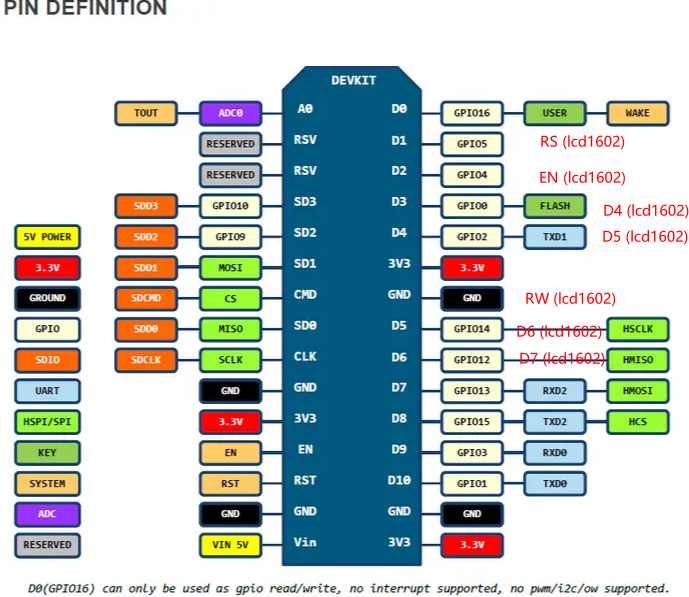
正文摘要:硬件 esp8266開發板(ch340g)其它也差不多lcd1602 代碼(lcd1602四線驅動接法,省線,速度不如八線驅動) # include <LiquidCrystal.h> // 對應gpio5,4,0,2,14,12口,5 ----> rs,4 ----> en,d4-d7 ... |

|
#include <ESP8266WiFi.h> #include <WiFiUdp.h> #include <NTPClient.h> #include <Wire.h> #include <Adafruit_GFX.h> #include <Adafruit_SSD1306.h> #define ComMode 0x52 //4COM,1/3bias 1000 010 1001 0 #define RCosc 0x30 //內部RC振蕩器(上電默認)1000 0011 0000 #define LCD_on 0x06 //打開LCD 偏壓發生器1000 0000 0 11 0 #define LCD_off 0x04 //關閉LCD顯示 #define Sys_en 0x02 //系統振蕩器開 1000 0000 0010 #define CTRl_cmd 0x80 //寫控制命令 #define Data_cmd 0xa0 //寫數據命令 const char* ssid = "Xiaomi_56FB"; const char* password = "zhang8114"; // 東八區,一次設置,后面不再額外加時區 WiFiUDP ntpUDP; NTPClient timeClient(ntpUDP, "ntp.aliyun.com", 8*3600, 1000); #define SCREEN_WIDTH 128 #define SCREEN_HEIGHT 64 Adafruit_SSD1306 display(SCREEN_WIDTH, SCREEN_HEIGHT, &Wire, -1); #define HT_CS D6 #define HT_WR D7 #define HT_DATA D8 byte segCode[] = {0xA0,0xF8,0x90,0xB8,0xC8,0x28,0x20,0xF8,0x00,0x08}; int year, month, day, week, hour, minute, second; // --- HT1621 底層 --- void htSendBit(byte dat){ digitalWrite(HT_WR, LOW); digitalWrite(HT_DATA, dat); delayMicroseconds(1); digitalWrite(HT_WR, HIGH); delayMicroseconds(1); } void htSendByte(byte dat, byte len){ for(byte i=0;i<len;i++){ htSendBit(dat & 0x80); dat <<= 1; } } void htWriteCmd(byte cmd){ digitalWrite(HT_CS, LOW); htSendByte(0x00,4); htSendByte(cmd,8); digitalWrite(HT_CS, HIGH); } void htWriteRam(byte addr, byte dat){ digitalWrite(HT_CS, LOW); htSendByte(0xA0,4); htSendByte(addr<<2,6); htSendByte(dat,8); digitalWrite(HT_CS, HIGH); } void LCDoff(void) { htWriteCmd(LCD_off); } void LCDon(void) { htWriteCmd(LCD_on); } void ht1621Init(){ pinMode(HT_DATA, OUTPUT); pinMode(HT_WR, OUTPUT); pinMode(HT_CS, OUTPUT); LCDoff(); htWriteCmd(Sys_en); htWriteCmd(RCosc); htWriteCmd(ComMode); htWriteCmd(LCD_on ); LCDon(); } void htShowNum(byte addr, byte num){ if(num>9) num=0; htWriteRam(addr, segCode[num]); } void htDispTime(){ htShowNum(0, hour/10); htShowNum(1, hour%10); htShowNum(2, minute/10); htShowNum(3, minute%10); htShowNum(4, second/10); htShowNum(5, second%10); } // --- 時間解析(去掉了重復的時區偏移) --- void parseTimeFromUnix(unsigned long epoch) { // 直接用timeClient給的epoch,不再+8*3600 unsigned long secInDay = epoch % 86400; hour = secInDay / 3600; minute = (secInDay % 3600) / 60; second = secInDay % 60; unsigned long days = epoch / 86400; week = (days + 4) % 7; // 1970-01-01是周四,這里直接算對 year = 1970; while(true) { unsigned long daysInYear = 365; if((year % 4 == 0 && year % 100 != 0) || (year % 400 == 0)) daysInYear = 366; if(days < daysInYear) break; days -= daysInYear; year++; } const int DAYS_PER_MONTH[] = {31,28,31,30,31,30,31,31,30,31,30,31}; month = 0; while(true) { int daysInMonth = DAYS_PER_MONTH[month]; if(month == 1 && ((year % 4 == 0 && year % 100 != 0) || (year % 400 == 0))) daysInMonth = 29; if(days < daysInMonth) break; days -= daysInMonth; month++; } month += 1; day = days + 1; } // --- OLED顯示 --- void oledDispTime(){ display.clearDisplay(); display.setTextSize(1); display.setTextColor(WHITE); display.setCursor(0,0); display.print(year);display.print("-"); display.print(month);display.print("-"); display.println(day); display.setCursor(0,16); display.print("Week:");display.println(week); display.setTextSize(2); display.setCursor(0,32); if(hour<10) display.print("0"); display.print(hour);display.print(":"); if(minute<10) display.print("0"); display.print(minute);display.print(":"); if(second<10) display.print("0"); display.println(second); display.display(); } void setup() { Serial.begin(9600); ht1621Init(); if(!display.begin(SSD1306_SWITCHCAPVCC, 0x3C)){ while(1); } display.clearDisplay(); display.display(); WiFi.begin(ssid,password); while(WiFi.status() != WL_CONNECTED) delay(300); timeClient.begin(); } void loop() { timeClient.update(); parseTimeFromUnix(timeClient.getEpochTime()); oledDispTime(); htDispTime(); delay(500); } |
| 如何用ESP8266+HT1621B顯示時間,我一直都點不亮 |

| 時間哪里沒有實時更新呢,博主 |

|

 組圖打開中,請稍候......
 收藏
收藏 頂
頂 踩
踩